How to Prevent Muscle Knots from Sitting at a Desk

Table of Contents
- Why Prolonged Sitting Causes Muscle Knots (and How to Spot Them)
- Desk Posture for Neck and Shoulders: The Setup Checklist
- Movement Breaks While Working: How Often and How Long
- Stretches for Neck and Shoulder Tension You Can Do at Your Desk
- How to Relieve Muscle Knots When They Already Hurt
- A Timed Prevention Routine for Desk Workers
- Common Mistakes That Keep Muscle Knots Coming Back
- Frequently Asked Questions
Last Updated: October 6, 2026
Why Prolonged Sitting Causes Muscle Knots (and How to Spot Them)
Muscle knots form when a patch of muscle fibers stays contracted too long, and prolonged sitting is a common trigger.
This guide from TheCoolVibeShop breaks down how to prevent muscle knots from sitting at a desk, using simple setup changes, timed movement, and at-home recovery tools.
Trigger points are tight, tender bands inside a muscle that feel like small peas or cords under the skin.
Trigger Points vs. Everyday Muscle Stiffness
Everyday stiffness feels broad and eases once you move. A trigger point stays tender in one specific spot even after you stretch.
- Stiffness: a general, achy feeling across a wide area
- Trigger point: a pinpoint spot that hurts when pressed
- Stiffness: improves within minutes of moving
When a Knot Needs Professional Attention
Most desk-related knots respond to movement, stretching, and self-massage. See a doctor or physical therapist if you notice:
- Pain that radiates down an arm or leg
- Numbness, tingling, or weakness
- A knot that does not improve after two weeks
Desk Posture for Neck and Shoulders: The Setup Checklist
Good posture starts with your setup, not your willpower. A few measurements do more for your neck and shoulders than any reminder to "sit up straight." Set the baseline measurements first, then adjust for the area that tightens up on you.
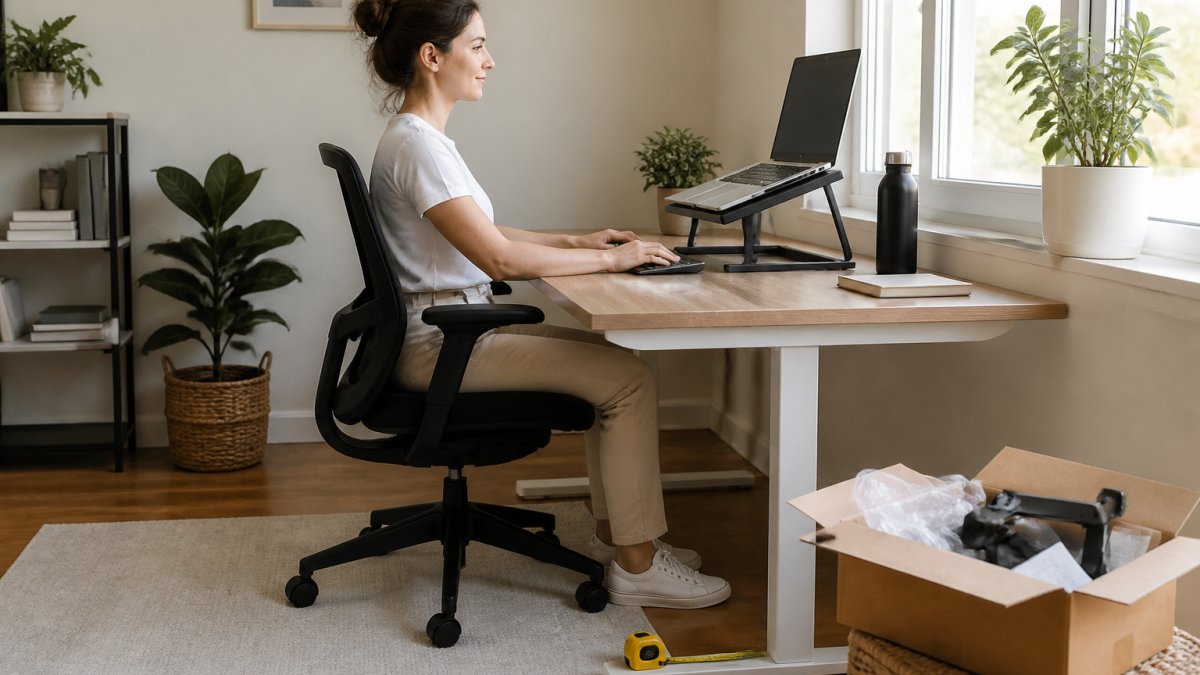
Measurements to Adjust: Chair Height, Desk Height, Screen Position
Use this checklist to set up your workspace:
- Chair height: feet flat on the floor, knees level with or slightly below hips
- Desk height: elbows bent to about 90 degrees, forearms parallel to the floor
- Screen position: top of the screen at or just below eye level
The OSHA computer workstation guide covers these same adjustments for reducing strain at a desk. OSHA's guidance is a useful baseline because it is written around the same measurements above, seat height, work surface height, monitor distance, and arm support.
Adjust in This Order
Change one thing at a time, working top to bottom:
- Chair height first. Everything else depends on where your hips and feet land.
- Foot support. If your feet dangle, add a footrest or a stack of books. If your knees sit above your hips, raise the chair.
- Desk or keyboard height. Elbows at roughly 90 degrees, wrists straight, not bent up or down.
- Screen height and distance. Top of the screen at or just below eye level, about an arm's length away.
- Chair back and lumbar support. The curve of your lower back should be supported, not flattened.
- Armrests. Set them so your shoulders stay relaxed, not shrugged.
Recheck the setup whenever you change chairs, desks, or move between home and office.
Adapt the Setup to Where You Hurt
A neutral setup is the starting point, not the finish line. If one area keeps tightening, nudge the setup toward it.
- Neck tension: raise the screen so you are not looking down. If you use a laptop, a stand plus an external keyboard is the single biggest change. Keep the screen close enough that you are not leaning forward.
- Shoulder and upper trap tension: lower the keyboard and mouse so your shoulders can drop. Move the mouse closer so you are not reaching. Set armrests so your elbows rest instead of float.
- Upper back tension: bring the screen closer and raise it slightly. Add a chair with better upper-back support, or use a lumbar cushion that also supports the mid-back.
A 60-Second Reset You Can Do Without Leaving the Chair
Setup alone will not hold if you never reset. Once an hour:
- Sit tall, feet flat, weight even.
- Chin tuck, pull your chin straight back, hold 3 seconds, release.
- Shoulder blade squeeze, pull them back and down, hold 3 seconds, release.
- Stand up, roll your shoulders, sit back down with the same tall posture.
That is it, not a workout, just a reminder to your muscles what neutral feels like.
Remote and Hybrid Setup Fixes
Laptop-only setups are the most common cause of neck and shoulder knots in home offices because the screen and keyboard are locked together. You cannot raise the screen without raising the keyboard.
- Laptop stand plus external keyboard and mouse is the highest-value upgrade.
- If you do not have a stand, stack books or a box under the laptop and use a separate keyboard.
- Kitchen table work: raise the laptop, lower the chair, and put a cushion behind your lower back.
Movement Breaks While Working: How Often and How Long
Movement breaks are the single most effective way to prevent muscle knots, and timing matters more than duration: a short break every 30 to 40 minutes beats one long break at lunch. But you need to know how often, how long, and what to do for the spot that is tightening.
How Often and How Long: A Practical Framework
Physical therapists and ergonomics specialists describe a 20-8-2 rhythm: for every 30 minutes at your desk, roughly 20 minutes of focused work, 8 minutes of lighter tasks (reading, calls, email), and 2 minutes of movement.
Use these ranges as a starting point:
- Micro-break: 20-60 seconds, every 20-30 minutes. Stand, shift weight, roll shoulders.
- Short break: 1-2 minutes, every 30-40 minutes. Walk to refill water, do a few calf raises.
- Reset break: 3-5 minutes, every 90-120 minutes. Full posture reset plus one targeted stretch.
If a knot is forming, shorten the intervals; if you are pain-free, stretch them slightly. The signal to tighten the schedule is tension, not the clock.
The 30-40 Minute Timer Method
Set a timer for 30 to 40 minutes. When it goes off, stand and move for 1 to 2 minutes.
- Stand and walk to refill your water
- Roll your shoulders back and forth
- Turn your head slowly left and right
CDC guidance on physical activity at work notes that breaking up long periods of sitting helps reduce muscle strain. The CDC's broader physical activity guidance for adults points to moving more and sitting less throughout the day, not just during a single workout.
Neck Massager with Heat – Electric TENS Cervical Massage Device →
Match the Break to Where It Hurts
Where you feel tension should shape what you do for those 1-2 minutes.
- Neck and upper traps: chin tucks, slow head turns, shoulder rolls, and a gentle ear-to-shoulder tilt. Avoid fast circles.
- Shoulders and upper back: doorway chest opener, shoulder blade squeezes, and arm reaches overhead. These counter the rounded-forward position.
- Lower back: stand and place hands on hips, gently arch and round the spine, then do a slow hip hinge. Walking is often the fastest relief.
Build the Break Into Your Environment
Willpower is a poor timer. Change your setup so the break happens without a decision.
- Put your water bottle across the room so refilling forces a walk.
- Use a standing desk or a countertop as a second work surface and alternate every 30-60 minutes.
- Keep a resistance band or massage stick within arm's reach so a micro-break has a clear action.
Pair your movement break with something you already do, like sipping water. You will refill your glass more often, which forces you to stand without relying on willpower alone.

Remote and Hybrid Work Adjustments
Improvised home setups make breaks harder because there is no office walk to the kitchen or copy room. If you work from a laptop on a couch or kitchen table, your break schedule needs to be more aggressive, not less.
- Treat every hour as a reset point if your setup is laptop-only.
- Stand for at least one call per day.
- Use a kitchen counter as a standing desk for 15-20 minutes at a time.
The goal is not a perfect ergonomic setup but interrupting the static position often enough that a knot never sets in.
Stretches for Neck and Shoulder Tension You Can Do at Your Desk
Stretches for neck and shoulder tension work best held long enough to feel a gentle pull, not pain. Aim for 20 to 30 seconds per stretch and breathe slowly throughout.
- Chin tuck: pull your chin straight back, hold, release
- Neck side stretch: tilt your ear toward your shoulder, hold, switch sides
- Shoulder roll: circle your shoulders slowly backward
If a stretch causes sharp pain or tingling, stop. Gentle is the goal.
How to Relieve Muscle Knots When They Already Hurt
Relieving an existing knot takes pressure, heat, and rest. Self-massage and targeted heat are the two most reliable at-home options.
Self-Massage Tools and At-Home Recovery Devices
A handheld massage tool lets you apply steady pressure to a specific spot: press into the knot, hold 20 to 30 seconds, release slowly, and repeat a few times.
For neck and shoulder tension, our Neck Massager with Heat combines gentle heat with customizable TENS-style stimulation.

If you prefer manual pressure, the Wood Therapy Massage Stick gives you full control over how hard you press on your back, arms, and legs.
A Timed Prevention Routine for Desk Workers
A routine only works if it fits your day. Follow this schedule without rearranging your calendar.
| Time | Action | Duration |
|---|---|---|
| Every 30-40 min | Stand and walk | 1-2 min |
| Every 2 hours | Neck and shoulder stretches | 2-3 min |
| Midday | Full posture reset at your desk | 5 min |
| End of day | Self-massage on tight spots | 5-10 min |
For deeper recovery after a long week, our Cordless Red Light Therapy for Neck & Shoulders uses 660nm red light and 850nm near-infrared light. It is cordless and hands-free, so you can wear it while you wind down.

Common Mistakes That Keep Muscle Knots Coming Back
The biggest mistake is treating the knot and ignoring the cause. If your setup and movement habits stay the same, the knot returns within days.
- Sitting for hours without a single break
- Stretching hard into a painful spot
- Ignoring stress, which tightens neck and shoulder muscles
The NIH information on muscle pain notes that stress and poor posture both play a role in ongoing muscle tension.
Frequently Asked Questions
How often should I take a movement break when sitting at a desk?
Set a timer for every 30 to 40 minutes. Stand up, walk for one to two minutes, and roll your shoulders back a few times. Short, frequent breaks beat one long break at lunch because they interrupt the static posture that lets muscle tension build. If you lose track of time, a phone timer or a smartwatch reminder works well. Pair each break with a glass of water so the habit sticks.
What stretches help prevent muscle knots from sitting?
Try a chin tuck, a doorway chest stretch, and a slow neck side bend held for 20 to 30 seconds each. Do them two or three times during the workday, not just once. Gentle stretches for neck and shoulder tension work best when muscles are warm, so move around for a minute first. Stop if you feel sharp pain or numbness, and see a healthcare professional if discomfort persists.
Can muscle knots be massaged out, or do they go away on their own?
Many muscle knots ease with time, rest, and movement, but massage can speed up relief by increasing blood flow and easing tight muscles. Self-massage with a handheld tool or a targeted device helps you work on hard-to-reach spots like the upper back. If a knot lasts more than a few weeks, causes tingling or weakness, or keeps returning in the same spot, have a healthcare professional evaluate it.
Why do my muscles feel tight when I sit, even if I have good posture?
Even good posture becomes a problem when you hold it without moving. Static posture keeps the same muscle fibers working for long stretches, which leads to muscle tension and stiffness over time. Stress adds to it by raising resting muscle tone. The fix is not a perfect position but frequent changes: shift, stand, walk, and stretch every 30 to 40 minutes. A supportive device like a neck massager with heat can help between breaks.
Desk work does not have to mean a locked-up neck and shoulders. At TheCoolVibeShop, we build non-invasive, drug-free wellness tools designed for daily use, including our cordless red light therapy device and heat neck massager, both backed by a 60-day money-back guarantee. Shop now and build a recovery routine that actually fits your workday.